


MangaBoya - Webtoon & Comics
4.116.00 Reviews
App Specs
- Version
- 2.1.2
- Updated On
- License
- Free
- Downloads
- 10,000+
- Developer
- WhiteStar Studio
- Categories
- Comics
- Platform
- Android, iOS
Screenshots

 Analysis by AppCompare
I like MangaBoya - Webtoon & Comics most as a convenient place to browse and keep up with comics, rather than as a promise that every reader will find every title they want. Its appeal is the combination of manga and webtoons, adjustable reading options, and tools for keeping track of several stories. That makes it worth a look if you enjoy exploring, though I’d still weigh its community and catalog against the more focused alternatives you may already use.
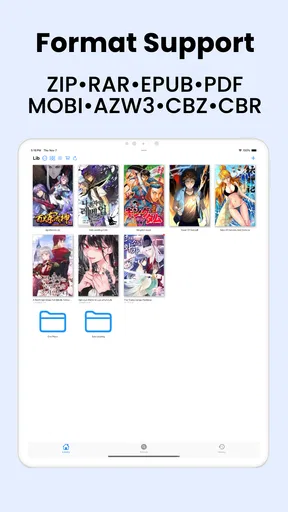
A practical fit for browsing across formats
MangaBoya is a comics app from WhiteStar Studio. It’s free to install, with in-app purchases listed from $4.99 to $59.99 per item, so I’d treat it as something to try before deciding whether any paid option suits your reading habits. It has a Teen age rating, and its current version is 2.1.2. The app has a 4.1 average from around 458 ratings and over 10,000 installs. Those figures suggest a modest, established audience, not a reason on their own to assume it will match a large, specialist comics service.
The useful question is what you want from a reading app. If you switch between manga and vertical webtoons, having both in one place can make casual discovery easier. If you already follow a fixed list of series in a dedicated service, however, a broader app only helps if its selection and reading flow fit those specific titles. I’d use MangaBoya as a browsing companion first, then judge how well it supports the stories I actually want to continue.
Small reading choices that matter over time
The controls described in the app make a practical difference during longer sessions: brightness adjustment and day or night modes can help you settle in under different lighting, while the reading-direction choice is useful when moving between material designed for different conventions. I’d set these options before starting a long chapter, rather than interrupting the story later to fix a direction or screen that feels uncomfortable.
Bookmarks also have a more useful role than simply marking a page. When I’m following multiple series, I can use them as a lightweight checkpoint system: finish one chapter, save my place, and move on without relying on memory. That is especially handy when reading in short gaps through the day. It does not replace a carefully managed reading list, but it can reduce the little bits of friction that make a collection of ongoing stories hard to follow.
Where expectations need to stay realistic
An all-in-one catalog sounds appealing, but breadth and depth are different things. A large mix of genres does not automatically mean the particular series I follow are available, current, or presented the way I prefer. Regular additions are welcome, yet they don’t guarantee that an update will land when I expect it. I’d search for a few specific titles that matter to me before making this my main reading home.
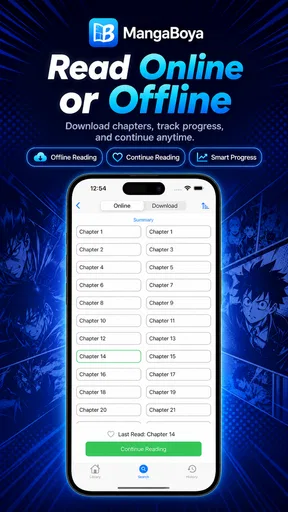
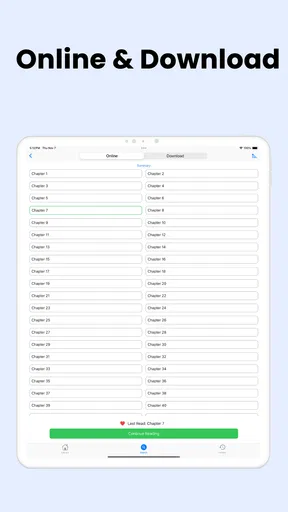
Offline reading is another convenience with a trade-off: downloading chapters can help when I expect to be away from a reliable connection, but it takes preparation. I’d save the material before a commute or a trip, rather than assume I can open something new without internet access. I’d also keep an eye on storage if I tend to download several series at once. This is a simple habit, but it matters more than the feature label when planning a long journey.
Worth Reading Before You Choose

Flipboard Shows What News Apps Must Do Beyond the Feed

Switching to Android Auto Means Rethinking Your Driving Routine

Google Calendar Makes a Crowded Week Easier to Manage

Ludo King Makes the Most of the Minutes Between Plans

Baby Panda World Brings Quick Play to Modern Phones, but Its Game Library Feels Busy

ESPN’s Live Game View Makes Following Close Games Easier
The social layer may suit readers who enjoy reacting to a twist or comparing impressions, but it won’t be a reason to use the app for everyone. Comments and forums can add context and shared enthusiasm; they can also make it easier to encounter spoilers before catching up. I’d read discussion only after finishing the relevant chapter, and I’d skip community features altogether if I want a quiet, distraction-free session.
The Interface: A Manga Lover's Dream?
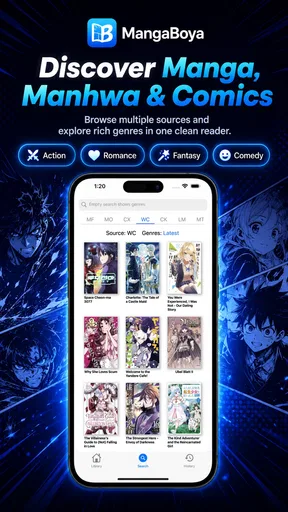
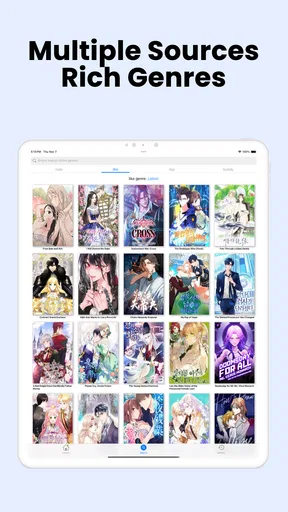
First things first, the interface of MangaBoya is pretty slick. When you open the app, you're greeted with a clean and intuitive design that makes navigation a breeze. The home screen is neatly organized with sections for the latest releases, popular titles, and recommendations based on your reading habits, making it easy to find something new to read.
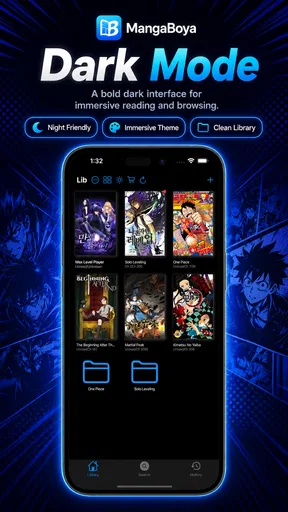
One of my favorite features is the ability to customize your reading experience. You can adjust the brightness, switch between day and night modes, and even choose your preferred reading direction. It's like the app knows exactly what you need before you even realize you need it!
Content Galore: A Treasure Trove of Stories
Now, let's talk about the real meat of the app: the content. If you're worried about running out of things to read, fear not. MangaBoya boasts an extensive library of manga and webtoons across various genres. Whether you're into action-packed adventures, heartwarming romances, or spine-chilling horror, there's something here for everyone.
The app also offers a mix of both popular and lesser-known titles, which is great if you’re looking to discover hidden gems. Plus, with regular updates, you’ll always have fresh content to dive into.
Reading Experience: Smooth and Seamless
Reading on MangaBoya is a pleasure. Pages load quickly, and the images are crisp and clear. The app also supports offline reading, so you can download your favorite comics and read them on the go without worrying about your data plan.
One nifty feature is the bookmarking option. It allows you to save your place in a story, which is super handy if you're juggling multiple series at once (guilty as charged!).
Community and Interaction: A Social Twist
What sets MangaBoya apart is its community aspect. You can connect with other manga fans, share your thoughts on different series, and even follow your favorite creators. It’s like having a mini social network dedicated solely to your manga obsession. Pretty cool, right?
The app also encourages user interaction through its comment sections and forums, where you can discuss plot twists, character developments, or just gush about your latest read.
Finding a routine that suits the app
A realistic way I’d use it is to browse for a new series at home, save my place in anything I’m already reading, then download a few chapters before heading out. On a bus ride, I can pick up where I left off without depending on a steady connection. Later, I might check a discussion after finishing the chapter, rather than risk seeing reactions that spoil the next plot point. That routine uses the app’s variety, bookmarks, downloads, and community without making every part of the experience mandatory.
For a new reader, I’d start with one or two genres I already enjoy and sample a title before building a long queue. For someone returning to comics after a break, the mix of familiar popular material and less familiar stories could make browsing feel less like homework than searching title by title. The trick is to treat recommendations as a starting point, not a guarantee that every suggestion will suit your taste.
How it compares with other ways to read
Compared with a publisher-focused manga reader, MangaBoya’s broader manga-and-webtoon approach is appealing if you don’t want to switch apps just because the format changes. A specialist service may be a better fit if your priority is a particular publisher’s releases or a tightly organized collection built around a known catalog. On the other hand, readers who mostly follow vertical-scroll webtoons may prefer an app centered on that format, where discovery and presentation are designed around it. MangaBoya’s value is in the mix, not in being the obvious best choice for every niche.
It also differs from reading in a browser: having reading controls, saved places, and offline access together can make repeat sessions feel more deliberate. But if you only read occasionally or prefer not to manage downloads and bookmarks, a browser or a single-title service may be simpler. I’d choose based on how often I switch between series and formats, rather than assuming that one app should replace every source I use.
Questions I’d settle before relying on it
Can I use it without paying? Yes, the app is free to install, though optional in-app purchases are listed. I’d try the free experience first and decide whether any purchase is useful to me, rather than treating a paid item as necessary. Is it suitable for younger readers? Its Teen rating makes it a more sensible choice for teens than for children, and parents should still make their own call about individual comics and discussions.
Will it work for a commute? Offline downloads make that possible when I prepare in advance; I wouldn’t count on fetching new chapters in a place with poor reception. Is it a good main app for a devoted reader? It could be, if the titles you care about are available and the reading style suits you, but I’d check those details before moving an established library. Can I avoid spoilers? I’d stay out of comments and forums until I’m caught up, since social discussion is best treated as optional rather than part of the reading itself.
The best audience is someone who likes to browse across manga and webtoons, reads in bursts, and values having basic customization and progress-saving tools together. It’s less compelling for readers who want a highly specialized catalog, a completely solitary experience, or a service chosen primarily for one particular series. Those are not flaws in the same way for everyone; they’re reasons to compare options against your own habits.
Content Galore: A Treasure Trove of Stories
Now, let's talk about the real meat of the app: the content. If you're worried about running out of things to read, fear not. MangaBoya boasts an extensive library of manga and webtoons across various genres. Whether you're into action-packed adventures, heartwarming romances, or spine-chilling horror, there's something here for everyone.
The app also offers a mix of both popular and lesser-known titles, which is great if you’re looking to discover hidden gems. Plus, with regular updates, you’ll always have fresh content to dive into.
Reading Experience: Smooth and Seamless
Reading on MangaBoya is a pleasure. Pages load quickly, and the images are crisp and clear. The app also supports offline reading, so you can download your favorite comics and read them on the go without worrying about your data plan.
One nifty feature is the bookmarking option. It allows you to save your place in a story, which is super handy if you're juggling multiple series at once (guilty as charged!).
Community and Interaction: A Social Twist
What sets MangaBoya apart is its community aspect. You can connect with other manga fans, share your thoughts on different series, and even follow your favorite creators. It’s like having a mini social network dedicated solely to your manga obsession. Pretty cool, right?
The app also encourages user interaction through its comment sections and forums, where you can discuss plot twists, character developments, or just gush about your latest read.
A clear verdict for curious comic readers
So, is MangaBoya worth the download? In my opinion, it absolutely is. With its user-friendly interface, vast array of content, and engaging community features, it offers a comprehensive experience for any manga lover. Whether you're a seasoned reader or just dipping your toes into the world of comics, MangaBoya has something to offer.
Go ahead and give it a try. Who knows? You might just find your next favorite series on MangaBoya - Webtoon & Comics. Happy reading!
Pros
- Extensive library with diverse genres.
- User-friendly interface for easy navigation.
- Regular updates with new content.
- Offline reading mode available.
- High-quality images enhance reading experience.
Cons
- Advertisements can be intrusive.
- Limited language options.
- Some features locked behind paywall.
- Occasional app crashes reported.
- Requires constant internet for updates.
FAQs for MangaBoya - Webtoon & Comics
What is MangaBoya - Webtoon & Comics, and what content does it offer?
MangaBoya - Webtoon & Comics is a comprehensive app designed for manga and webtoon enthusiasts. It offers a vast library of comics, ranging from popular series to hidden gems across various genres. Users can enjoy titles in multiple languages, ensuring a diverse reading experience. The app is regularly updated with the latest chapters, making it ideal for avid readers.
Is MangaBoya - Webtoon & Comics free to use, or are there subscription options?
MangaBoya offers both a free version and a premium subscription. The free version provides access to a wide range of comics but may include ads. The premium subscription removes ads and offers additional features like offline reading and early access to new chapters. Users can choose based on their reading preferences.
How user-friendly is the MangaBoya - Webtoon & Comics interface?
The interface of MangaBoya is designed to be intuitive and user-friendly. It features easy navigation with a clean layout, allowing users to browse through different genres and categories effortlessly. The search function is robust, making it simple to find specific titles or discover new series. The reading experience is seamless, with customizable settings to enhance comfort.
Can I download comics for offline reading on MangaBoya?
Yes, MangaBoya offers the option for premium users to download comics for offline reading. This feature is particularly useful for users who wish to enjoy their favorite series without an internet connection. Offline reading ensures that you can access your downloaded content anytime, making it convenient for travel or areas with limited connectivity.
Are there any community features available on MangaBoya - Webtoon & Comics?
MangaBoya includes several community features to enhance user interaction. Users can comment on chapters, share reviews, and engage with fellow readers. The app also provides recommendations based on reading history and user ratings, fostering a community-driven environment where enthusiasts can share their thoughts and discover new content together.


